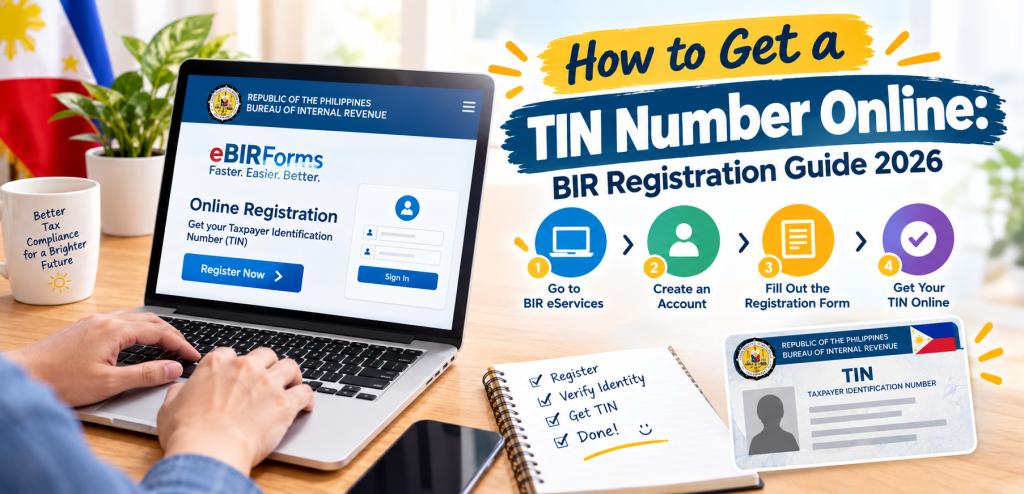
How to Get a TIN Number Online: BIR Registration Guide 2026
Step-by-step TIN online registration through BIR’s real ORUS system — how to avoid the many fake lookalike sites, and the ₱500 fee that no longer applies.
Sourced from PwC Philippines and KPMG Philippines’ professional tax publications, official BIR Revenue Memorandum Circulars, verified July 2026.
Getting a TIN online is genuinely straightforward once you’re on the real system — the harder part these days is actually finding it, given how many lookalike sites have sprung up around this exact topic.
First: There Are an Unusual Number of Fake “ORUS” Sites
If you searched for this topic, you’ve likely already run into domains like “orus.ph,” “orus.com.ph,” “birorus.ph,” or “orusbir.ph.” None of these are operated by BIR. The real system has one address: orus.bir.gov.ph, accessible directly or through the eServices icon on bir.gov.ph. Some of these lookalike sites are even upfront about not being official if you read their fine print — but their domain names are clearly designed to be mistaken for the real thing. Bookmark the real URL and go directly to it every time, rather than searching and clicking whatever comes up.
What ORUS Actually Is
ORUS (Online Registration and Update System) is BIR’s official web-based platform for registering a TIN, updating taxpayer records, and handling most registration-related transactions without an in-person RDO visit. It’s part of BIR’s Digital Transformation Roadmap, launched under Revenue Memorandum Order No. 27-2020, in line with the Ease of Doing Business Act (RA 11032).
A quick timeline of how it’s grown, since this system has been rolled out in stages, not all at once:
- December 2022 (RMC 153-2022): ORUS became available at orus.bir.gov.ph
- Early 2023 (RMC 12-2023, RMC 36-2023): registration info updates, business search, secondary registrations, and de-registration processing added
- November 2023 (RMC 120-2023): Digital TIN ID launched
- January 2024 (RMC 10-2024): Branch account enrollment added for businesses
- April 2026 (RMC 34-2026): Digital TIN ID access expanded to the government’s eGovPH Mobile App
Before You Register: Update Your Email With BIR First
This step trips up a lot of existing taxpayers trying to use ORUS for the first time: BIR requires your official email address on file to match what you use for ORUS. If you already have a TIN but never formally registered an email with BIR, you’ll need to submit BIR Form S1905 (Registration Update Sheet) to your assigned RDO first, listing your own contact details (not a representative’s or tax agent’s) — BIR uses this email to send official notices, so it needs to be one you actually control.
If you’re a first-time applicant with no existing TIN, this step doesn’t apply to you — you’ll set up your email directly during registration.
How to Register for a TIN Online: Step-by-Step
- Go directly to orus.bir.gov.ph.
- Select “Register” or “New Registration.”
- Choose whether you’re registering as an Individual or Non-Individual (business/corporation).
- Enter your personal details. If you already have an existing TIN, enter it here — do not attempt to register a new one if you’re unsure whether you already have a TIN (remember, having more than one is criminally punishable).
- Set your password and submit.
- Check your email for a verification link and click it to activate your account. Note: the exact expiry window for this link isn’t something we could independently confirm from an official BIR source — some unofficial guides claim 24 hours, but treat that as an estimate, not a guarantee. To be safe, verify your email promptly rather than leaving it for later, and if a link doesn’t work, the safest fix is simply registering again with the same email rather than assuming a specific expiry has passed.
- Once verified, log in and select the appropriate registration form for your situation: Form 1902 (employee), Form 1901 (self-employed/freelancer), or Form 1904 (one-time transaction/first-time job seeker under E.O. 98).
- Upload the required supporting documents as PDF or image scans.
- Complete any applicable payment through the ORUS online gateway.
Good News on Fees: The Annual Registration Fee Is Gone
If you’re researching this based on older information, know that the ₱500 Annual Registration Fee (ARF) that businesses and self-employed taxpayers used to pay every January has been abolished entirely. Under RA 11976 (the Ease of Paying Taxes Act), BIR ceased collecting the ARF effective January 22, 2024. Some remaining fees (like the Documentary Stamp Tax on certain registrations) may still apply depending on your specific transaction — but the recurring annual fee itself is gone.
Getting Your Digital TIN ID After Registration
Once your TIN is set up:
- Log in to your ORUS account.
- Select “Get Your Digital TIN ID” from the dashboard.
- Upload a 1×1 photo — plain white background, good lighting, no filters.
- Submit and wait for approval.
- Download your Digital TIN ID as a PDF once approved.
Important: per the actual text of RMC 121-2023, once your Digital TIN ID is generated, you can only regenerate or update it (for name, address, or RDO changes) 30 days after the first or most recent generation — confirmed consistently across multiple professional tax advisories. Double-check your name, address, and other details carefully before generating it. If something’s wrong, correct it via Form S1905 first, then generate your ID.
If the System Seems Slow or Unresponsive
ORUS has experienced periods of technical downtime and migration-related issues in the past, per BIR’s own circulars extending certain deadlines because of it. If the system is unusually slow or unresponsive when you try to register, this isn’t necessarily something wrong on your end — it’s worth trying again later rather than assuming you’ve made an error, and checking BIR’s official channels for any current system status advisories.
FAQs
Certain transactions (new business registrations, Books of Accounts registration, most updates) are increasingly handled through ORUS, but highly complex cases may still require manual RDO processing. For basic individual TIN registration, ORUS is generally the fastest path.
Check your spam/junk folder first. If it’s genuinely not arriving after a reasonable wait, the safest fix is registering again with the same email rather than assuming a specific expiry window has passed.
Basic TIN registration itself doesn’t carry the old Annual Registration Fee anymore. Some specific transactions may still involve a Documentary Stamp Tax or similar fee — check what applies to your specific registration type within ORUS.
Yes — ORUS registration is independent of a prior in-person attempt, though if you were told you already have an existing TIN, use that instead of trying to register a new one online.
Only use the official orus.bir.gov.ph domain to enter any personal information — the lookalike sites mentioned earlier are not verified as secure or affiliated with BIR, and entering personal data on them is a real risk.
Related guide: TIN ID Requirements Philippines 2026: Complete Application Checklist