Skip to content
September 13, 2026
Alamin mo. Ayos na.

Alamin Mo

Alamin mo. Ayos na.

Primary Menu Alamin mo. Ayos na.

Alamin Mo

  • Government & RequirementsDealing with Philippine government paperwork shouldn’t feel like a full-time job. This section walks you through the processes people get stuck on most — SSS loans and contributions, PhilHealth registration and updates, TIN and BIR requirements — with clear, step-by-step guides based on the actual current rules, not outdated forum advice from five years ago. Kung nalilito ka sa mga requirements o hindi mo alam saan magsisimula, dito ka dapat pumunta. Each guide breaks down exactly what you need, where to go (online or in-person), and what to do when something goes wrong — a rejected application, a missing contribution, a portal that won’t let you log in. We check every guide against official government sources and update them when processes change, so you’re not left applying outdated steps to a system that’s already moved on.
    • SSSYour SSS membership covers more than just retirement — it’s also where you turn for salary loans, contribution tracking, and fixing account problems when something doesn’t add up. This section covers the SSS processes people search for most: how to apply for and check the status of an SSS salary loan, how to check your contributions online, how to register for and use My.SSS, and what to do if you’ve lost your SSS number. Bawat guide dito ay hakbang-hakbang, based sa current My.SSS portal at official SSS requirements — hindi outdated na proseso o generic na sagot. Whether you’re employed, self-employed, an OFW, or a voluntary member, these guides walk you through exactly what applies to your situation.
    • PhilHealthWhether you’re checking if your employer is remitting correctly, figuring out your 2026 contribution rate, or updating your PhilHealth information, this section covers the PhilHealth processes people actually get stuck on. Guides here walk through the PMRF updating form, contribution tables, self-employed and freelancer requirements, and how OFWs handle PhilHealth payments while working abroad. Malinaw at direkta ang bawat guide dito — kasi kapag PhilHealth ang usapan, kailangan mo ng sagot bago pa man dumating ang emergency, hindi pagkatapos. We keep these updated against the current contribution schedule and official PMRF requirements, since PhilHealth’s rules and rates change from year to year.
    • TIN/BIRGetting a TIN, filling out the right BIR form, or transferring your RDO shouldn’t require a law degree to understand. This section breaks down TIN ID requirements, how to register for a TIN online, and which BIR form you actually need — Form 1901, 1902, or 1905 — for your specific situation, whether you’re a first-time employee, self-employed, or transferring records. Alam naming nakakalito ang mga BIR form kaya isa-isa naming ipinapaliwanag kung alin ang kailangan mo at paano ito i-submit nang tama. Every guide is checked against current BIR requirements, since form versions and RDO processes are updated periodically.
  • Digital FinanceGCash, Maya, digital banks, online loans — Filipinos are moving money digitally more than ever, but the fine print, fees, and fraud risks aren’t always clear. This section breaks down how to actually use these platforms well: comparing digital banks, understanding loan terms before you sign up, beginner investing options like GInvest, and how to spot scams targeting digital wallet users. Dito namin ipapaliwanag nang simple ang mga app at platform na ginagamit mo na, para alam mo kung ano talaga ang binabayaran mo at kung paano ka mananalo. We test and verify what we recommend — no sponsored “best app” lists without real comparison behind them.
  • OFW & RemittanceWorking abroad comes with its own paperwork maze — remittances, visas, work permits, and staying compliant with Philippine requirements while you’re thousands of miles away. This section covers what OFWs actually need: how to send money home without losing money to bad exchange rates, visa and work permit guides by country, balikbayan box rules, and how to handle SSS, PhilHealth, and other Philippine requirements while working overseas. Alam namin mahirap makipag-ugnayan sa Pilipinas kapag malayo ka — kaya ginawa naming malinaw at direkta ang bawat guide, walang paligoy-ligoy. Every guide here accounts for the reality of managing Philippine paperwork from another country, not just the standard in-person process.
  • Real EstateBuying property in the Philippines involves more moving parts than most people expect — Pag-IBIG loans, lot titling, condo unit selection, and knowing the difference between a good deal and a legal headache. This section walks through the real estate process step by step, from your first Pag-IBIG loan application to understanding what you’re actually signing. Malaking desisyon ang bumili ng bahay o lupa — kaya dapat malinaw ang bawat hakbang bago ka pumirma ng kahit ano. These guides are written for first-time buyers who want to understand the process clearly before committing real money to it.
  • Food & LifestyleFilipino recipes, food business ideas, and everyday life tips — the lighter side of navigating life in the Philippines. This section covers home-cooked classics, small food business guides for aspiring entrepreneurs, and practical lifestyle content that doesn’t require a government form to enjoy. Dito, hindi tungkol sa paperwork — dito tungkol sa pagkain, negosyo, at mga bagay na nakakatuwang pag-usapan. A lighter counterpart to the rest of the site — same trustworthy approach, just a break from the bureaucracy.
  • Home
  • Government & Requirements
  • SSS
  • How to Register for My.SSS Online (Complete 2026 Guide)
  • SSS

How to Register for My.SSS Online (Complete 2026 Guide)

Vic Gonzales III August 12, 2026 0

Step-by-step guide to registering for My.SSS — what you need (including the 1-contribution eligibility rule), the 5 identity verification options, and how to fix the most common registration errors.
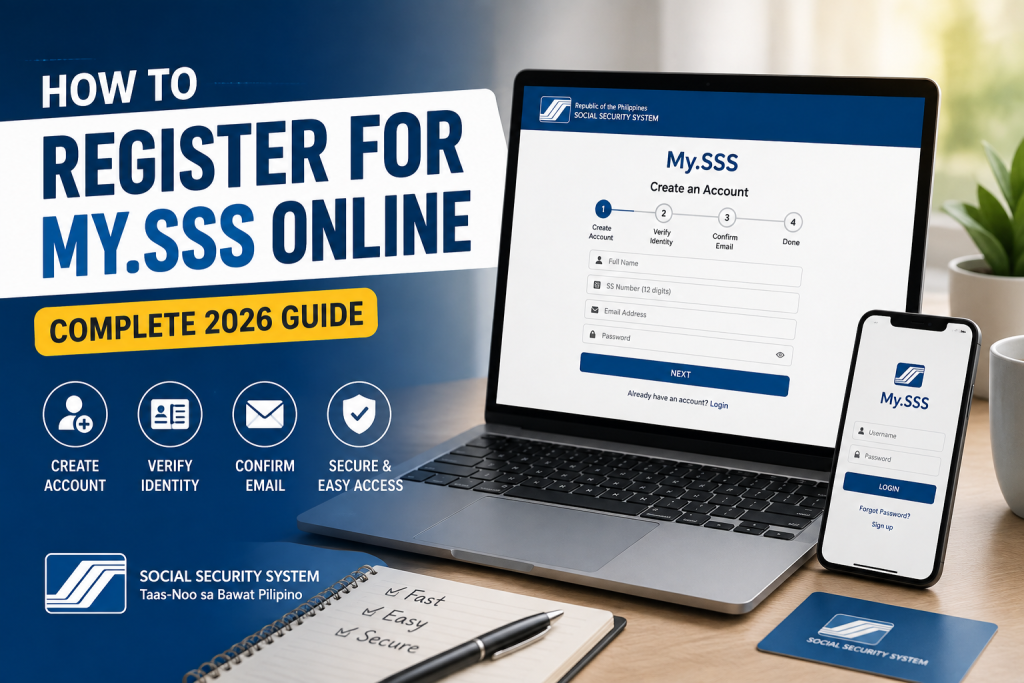
How to Register for My.SSS Online

Steps and eligibility requirements below are sourced from the official SSS My.SSS Member Registration Guide and SSS’s own official correspondence (via an FOI response), verified July 2026.

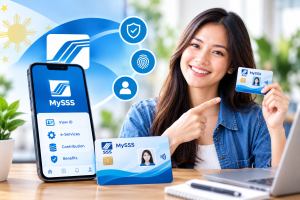
My.SSS is your online portal for checking contributions, applying for loans, and managing your SSS membership without visiting a branch. If you already have an SSS number but haven’t registered for online access yet, here’s exactly how to do it.

Note: this guide is for people who already have an SS Number and want to register for the My.SSS online portal. If you don’t have an SS Number yet, you’ll need to apply for one first — SSS now allows this online too, including for self-employed individuals and freelancers who’ve never had an SS number before.

Before You Start: What You’ll Need

Eligibility requirement: you need at least 1 posted monthly contribution before you can register for My.SSS. This applies whether you’re employed (reported by an employer), self-employed, voluntary, an OFW, or a non-working spouse. If you have an SS Number but zero posted contributions yet, registration will fail — wait until your first contribution posts before attempting to register.

  • Your SS Number (10 digits) or CRN (Common Reference Number)
  • A working email address you can access
  • Your exact name and date of birth as recorded with SSS — mismatches (e.g., “Ma.” vs. “Maria”) are the most common cause of registration failure
  • One of the following, to verify your identity (you’ll choose one during registration):
    • A way to verify your identity during registration — SSS will ask you to choose a verification method from several options presented in a dropdown, which may include:
    • Savings account number, Citibank Cash Card, UBP Quick Card, or UMID-ATM savings account number registered with SSS
    • Mobile number registered with SSS
    • UMID card details (6-digit PIN or mother’s maiden name)
    • Employer ID Number / Household Employer ID Number
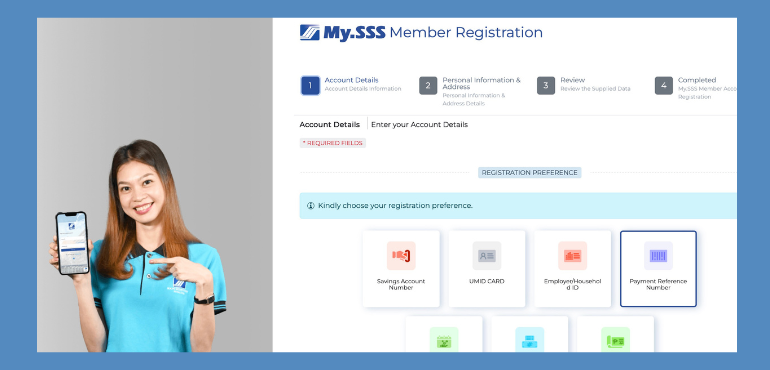
    • Payment Reference Number (PRN)
    • Note: sources vary on the exact number of options shown in the dropdown (some list around 5 grouped categories, others count up to 8 individual choices) — the methods above are confirmed accurate; the exact on-screen count may vary slightly by account type.

How to Register for My.SSS: Step-by-Step

  1. Go to the official SSS website and find the My.SSS registration/login area.
  2. Read the registration reminders, check the certification box confirming you’ve read them, then click Proceed.
  3. Enter your CRN/SS Number, a valid email address, and your preferred User ID.
  4. Enter your complete name and date of birth exactly as they appear in SSS records.
  5. Confirm your date of birth when prompted.
  6. Enter your mailing address (or foreign mailing address, for OFWs).
  7. From the dropdown, select your preferred verification method, and enter the corresponding details.
  8. Submit the form.
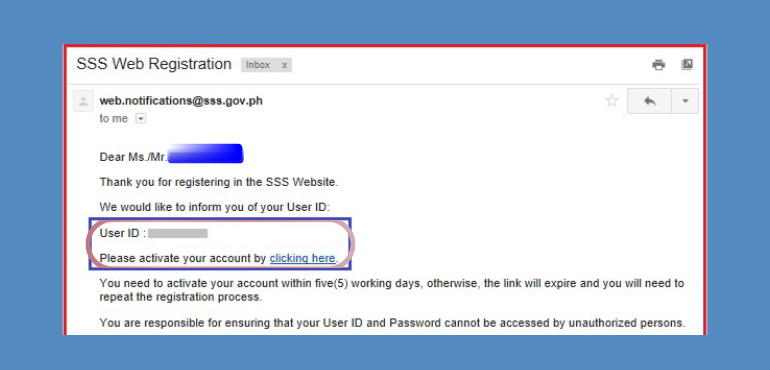
  9. Check your email for a message from SSS containing your User ID and an activation link. Activation links expire, so complete this step promptly — if it lapses, you’ll need to repeat registration.
  10. Click the activation link, then enter the last 6 digits of your CRN/SS Number to proceed to password setup.
  11. Set your password, following SSS’s requirements: 8–20 alphanumeric characters, first character must be a letter, no special characters.
  12. Set your security questions and recovery options.
  13. Log in to confirm your account is active.

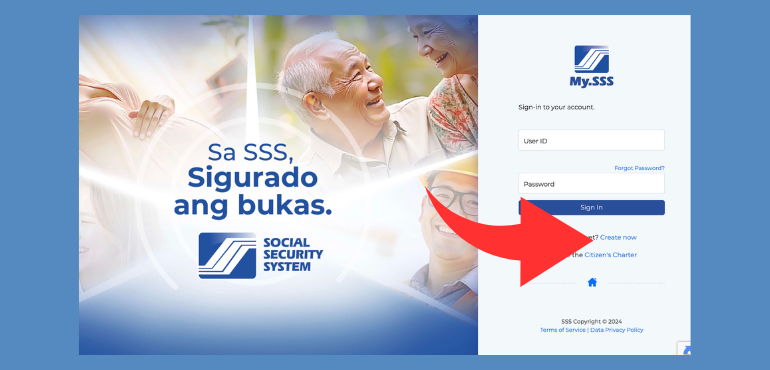
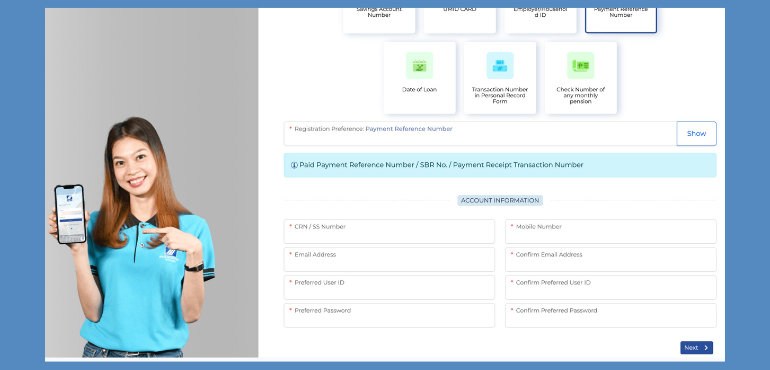
Actual screenshots of the page on how to register for my.SSS
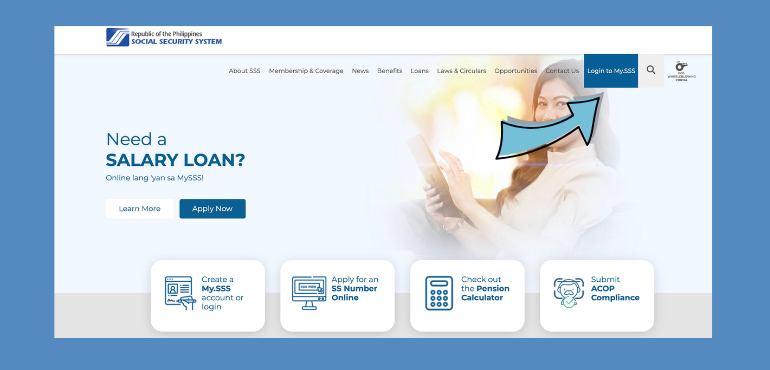
ss website and button for My SSS page

My SSS log in page and create account

My SSS registration form and options page

My SSS registration options and fill up window

My SSS User ID and an activation link email after registration

Common Registration Errors and How to Fix Them

  • “Information doesn’t match our records” — usually caused by a name or birthdate mismatch. Double-check exactly how your name is recorded with SSS (including middle initials, suffixes like “Jr.,” or religious titles like “Ma.”) and retry.
  • Chosen verification option fails — if your mobile number doesn’t work, for example, try a different option from the list (UMID card, employer ID, PRN, etc.) instead of repeating the same failed one.
  • No activation email received — check your spam/junk folder first, and whitelist SSS’s sender domain. If it’s still missing after checking, retry registration once the previous attempt times out, since a pending unconfirmed registration can block a new attempt.
  • Still stuck after trying alternatives? SSS’s own official channels for registration issues are:
    • Email: usssaptayo@sss.gov.ph (SSS’s official general inquiry email, confirmed directly on multiple sss.gov.ph pages)Hotline: 1455 (general), or (02) 920-6446 to 55, Monday–Friday, 8:00 AM–5:00 PMuSSSap Tayo CRMS Portal (crms.sss.gov.ph) — SSS has specifically directed members with unsuccessful online registrations to this portal in their own official correspondence

When reaching out, include your full name, 10-digit SSS number, a screenshot of the error message, and a valid ID.

FAQs

Do I need an SS Number before I can register for My.SSS? Yes — My.SSS registration is for people who already have an SS Number and at least 1 posted monthly contribution. If you don’t have an SS Number yet, apply for one first. If you have an SS Number but no contributions posted yet, wait until your first contribution posts before registering.

I have an SS Number but registration keeps failing — why? The most common cause after a name/birthdate mismatch is not yet having a posted contribution — SSS requires at least one before online registration is allowed. Check your contribution status first (see our guide on checking SSS contributions online) before troubleshooting anything else.

Is registering for My.SSS free? Yes, there’s no fee to register for or use the My.SSS portal.

Can OFWs register for My.SSS from abroad? Yes — OFWs can register using an active international mobile number and a valid email address during the registration process.

What if I forgot which registration option I used, or my details don’t match anymore (e.g., changed mobile number)? Try each available verification option in turn. If none work because your records are outdated, you may need to update your information with SSS directly, or visit a branch to update your records before completing online registration.

How long does the whole registration process take? If you have all your information ready and everything matches on the first try, the form itself takes about 10-15 minutes. Account activation depends on how quickly you complete the email verification step.


Related guides: SSS Salary Loan: Complete 2026 Guide · How to Check Your SSS Contributions Online
Post navigation

Previous: How to Check Your SSS Contributions Online (2026 Guide)

Next: Forgot Your SSS Number? Here’s How to Recover It Fast (2026)

More Stories

SSS maternity benefits title banner
  • SSS

SSS Maternity Benefits: Complete 2026 Guide

Vic Gonzales III August 24, 2026 0
SSS Contribution Table 2026: How Much Should You Pay
  • SSS

SSS Contribution Table 2026: How Much Should You Pay

Vic Gonzales III August 21, 2026 0
SSS Number vs. CRN vs. UMID
  • SSS

SSS Number vs. CRN vs. UMID: What’s the Difference?

Vic Gonzales III August 17, 2026 0

Leave a Reply Cancel reply

Your email address will not be published. Required fields are marked *

Recent Posts

  • TIN ID Requirements Philippines 2026: Complete Application Checklist
  • PhilHealth Contribution Delayed or Not Posting? Here’s What to Do
  • PhilHealth OFW Payment: How and When to Pay While Working Abroad
  • PhilHealth for Self-Employed, Freelancers, and Online Sellers: Do You Need to Pay?
  • PhilHealth Updating Form (PMRF): How to Update Your Info Online
No comments to show.

Archives

  • September 2026
  • August 2026

You may have missed

image of tin id requirements complete application checklist
  • TIN/BIR

TIN ID Requirements Philippines 2026: Complete Application Checklist

Vic Gonzales III September 12, 2026 0
a philhealth contributor looking into the laptop screen worried why her contributions are not posted
  • PhilHealth

PhilHealth Contribution Delayed or Not Posting? Here’s What to Do

Vic Gonzales III September 9, 2026 0
PhilHealth OFW Payment: Rates, OEC Status, Reimbursement
  • PhilHealth

PhilHealth OFW Payment: How and When to Pay While Working Abroad

Vic Gonzales III September 7, 2026 0
PhilHealth for Self-Employed, Freelancers, and Online Sellers: Do You Need to Pay?
  • PhilHealth

PhilHealth for Self-Employed, Freelancers, and Online Sellers: Do You Need to Pay?

Vic Gonzales III August 30, 2026 0
PhilHealth Updating Form (PMRF): How to Update Your Info Online
  • PhilHealth

PhilHealth Updating Form (PMRF): How to Update Your Info Online

Vic Gonzales III August 29, 2026 0
  • About
  • Contact
  • Privacy Policy
  • Disclaimer
Copyright © All rights reserved. | Alamin Mo by Vic Gonzales III.